

Footnotes on the Web

7th October, 2026
According to The Free Dictionary, footnotes are:
- A note placed at the bottom of a page of a book or manuscript that comments on or cites a reference for a designated part of the text.
- Something related to but of lesser importance than a larger work or occurrence.
Footnotes in books work because they are at the bottom of the page. With books all the reader has to do is glance down to the bottom of the page, read the footnote, and look back up to return to where they left off. The same isn’t true for web pages. Footnotes on a web page can be links, pop-ups, or completely replaced with something like sidenotes. Footnotes on a web page can also be affected by UI elements that get in the way.
Some Problems With Footnotes on the Web
Scroll
The most common type of footnote I’ve come across on the web are links. Often the reader has to click the footnote link, wait for the page to scroll to the footnote at the bottom of the page, read the footnote, then click the return link, wait for the scroll again, then carry on reading the main article. A good footnote link will be a direct and quick jump to the footnote and will not take over the scroll of the page. You might think that scroll is a minor annoyance, but it is one that grows as the article gets longer.
Superscript
A footnote link should be easy to click, especially on mobile. Superscripting the link makes clicking/tapping it harder. Superscription works in books because there is nothing to click.
Yo-yo Headers
Yo-yo headers are headers that disappear when scrolling down a page but then reappear when scrolling up a page. Yo-yo headers are bad enough on their own, but if a site has a return link in the footnote that scrolls the page back up to the footnote link, then this will cause the header to reappear and cover the main article text around the footnote link. Now the reader has to manually scroll the text into view.
Pop-up Notes
Pop-up notes are footnotes that appear when a user hovers over a footnote link. But hover doesn’t work on mobile.
Tufte
One of the best solutions to footnotes on the web is sidenotes. I don’t know if Edward Tufte invented sidenotes, but they are prevalent in his books and can be replicated on the web using Tufte CSS. To quote the Tufte CSS web page:
Sidenotes are like footnotes, except they don’t force the reader to jump their eye to the bottom of the page, but instead display off to the side in the margin.
Sidenotes being directly to the right of the text (in the margin) means that the reader only had to glance sideways to read it, which makes its disruption to the reading flow similar to that of a footnote in a book. However, I do have a problem with sidenotes on mobile.
On mobile, sidenotes are hidden and the reader has to click the superscripted link (actually a hidden checkbox) to view the sidenote; when clicked, the sidenote then appears under the sentence in which the sidenote link appears. This does work but it is a bit jarring. The sidenote appears in the middle of the paragraph and looks like it has been jammed in there — it’s not the end of the world but it does look a bit off. Some people have tried to remedy this by showing the sidenote at the end of the paragraph that contains the sidenote link, but this disrupts the reading flow a bit more, especially if the paragraph is long.
Inline Notes
If you are like me then you always read the footnotes because you don’t want to miss any information, even if it is considered less important than the main text. So my solution to the footnote and sidenote problems is to have the note inline:
Pros of the inline note:
- no scroll;
- no superscription and is easy to click;
- no need to look anywhere else on the page to read the note;
- easy to notice, but also easy to ignore;
- easy to hide by clicking anywhere in the note;
- works exactly the same on mobile and desktop.
Cons of the inline note:
- unknown (hopefully the chevron indicates that there is something there);
- requires JavaScript to work (footnote links and sidenotes don’t require JavaScript to work);
- text reflow if
text-wrap: prettyis used on paragraphs containing inline notes.
Text Reflow
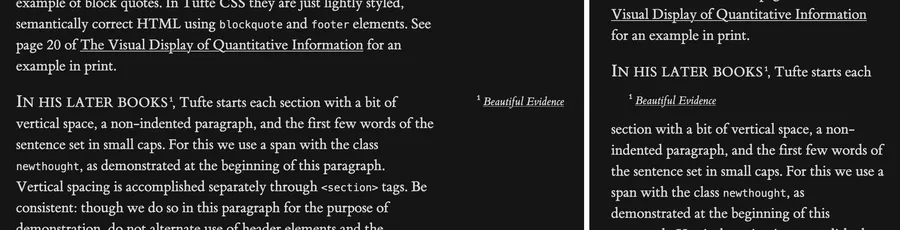
If text-wrap: pretty is used on a paragraph (and the browser supports it) that contains an inline note, opening the inline note will cause the text in that paragraph to reflow due to the ‘pretty’ algorithm recalculating the text wrap layout of the paragraph.
text-wrap: pretty and text reflow when opening the inline note. Bottom: text-wrap: pretty is not used and so there is no text reflow when opening the inline note.Inline Note Web Component
This website is built using Astro, which makes it easy to create web components, and the inline note is a web component:
---
interface Props {
id: string;
}
const { id } = Astro.props;
---
<inline-note
aria-expanded="false"
aria-controls={`${id}-inline-note`}
tabindex="0"
role="button"
>
<span class="chevron">❱</span>
<span id={`${id}-inline-note`} class="note-text" hidden>
<slot />
</span>
</inline-note>
<style>
inline-note {
color: var(--color-magenta);
background-color: var(--color-magenta-dark);
border-radius: 2px;
padding: 0 2px;
&:hover {
cursor: pointer;
}
}
</style>
<script>
class InlineNote extends HTMLElement {
connectedCallback() {
const chevron = this.querySelector(".chevron");
const noteTextSpan = this.querySelector(".note-text");
// open/show note text span, switch chevron and toggle aria-expanded
this.addEventListener("click", () => {
if (noteTextSpan?.hasAttribute("hidden")) {
noteTextSpan.removeAttribute("hidden");
chevron!.innerHTML = "❰ ";
this.setAttribute("aria-expanded", "true");
} else {
noteTextSpan?.setAttribute("hidden", "");
chevron!.innerHTML = "❱";
this.setAttribute("aria-expanded", "false");
}
});
// handle keyboard expansion/click
this.addEventListener("keydown", (e) => {
if (e.key === "Enter" || e.key === " ") {
e.preventDefault(); // prevent space from scrolling the page
this.click();
}
});
}
}
customElements.define("inline-note", InlineNote);
</script>A unique id is required for the component because it is an open/light web component without a shadow DOM to encapsulate the inner DOM, and it is used to distinguish between multiple copies of the component on a page for aria-controls.
And it is used like:
<InlineNote id="example">This is an inline note.</InlineNote>Conclusion
The inline note is a simple solution to the annoyances of footnotes and sidenotes, which works equally well on the web and on mobile. Although it requires JavaScript to work, and footnotes and sidenotes do not, the vast majority of people on the web will have JavaScript enabled. Personally, I don’t like or use text-wrap: pretty and so the reflow issue won’t affect this site. Will the inline note catch on?